NULLCLIENT
One launcher for everything: mods, modpacks, skins, friends and your own main menu in the game.
Featured server
EvilSMP
Already in your multiplayer list, and one click from the title screen.
play.evilsmp.net
The launcher
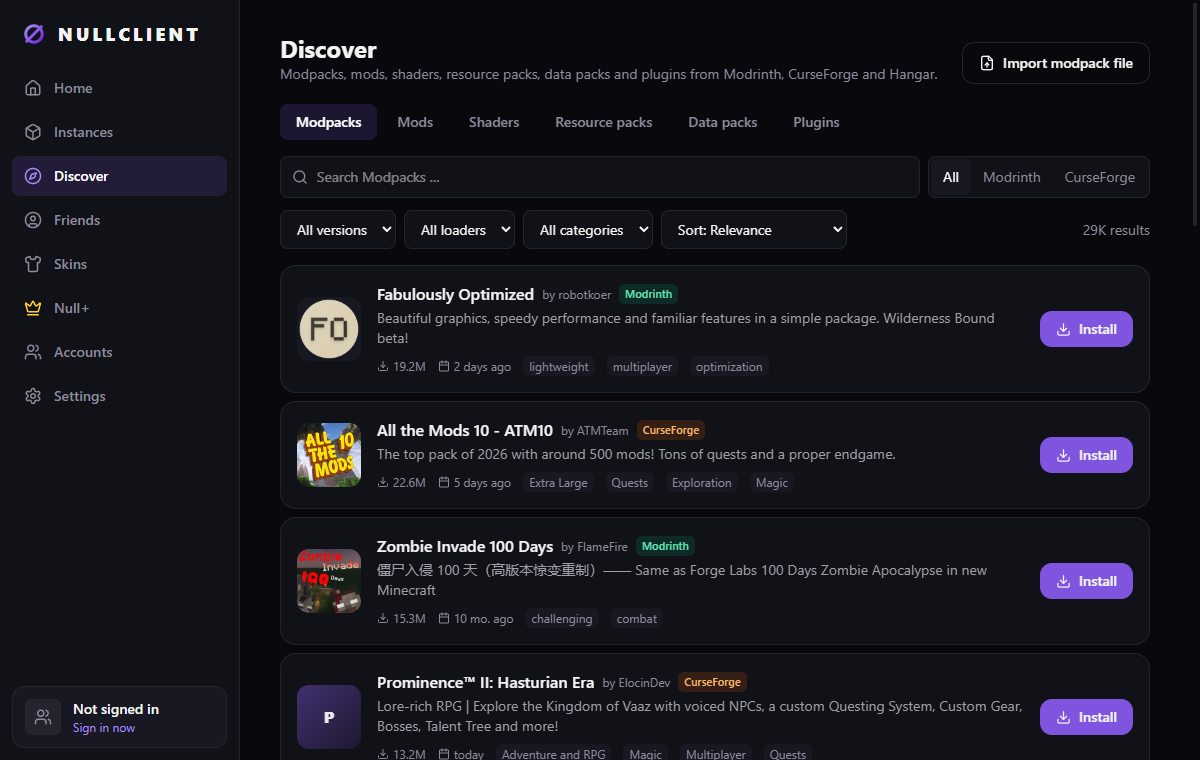
Every loader. Every mod. One window.
Search Modrinth, CurseForge and Hangar at the same time and install with one click. NULLCLIENT picks the version that fits your instance.
Instances
Separate setups with Vanilla, Fabric, Quilt, Forge or NeoForge. Java is downloaded for you, RAM is set per instance.
Mods, shaders & more
Mods, resource packs, shaders, data packs and server plugins. Check for updates and update everything at once.
Modpacks
Install modpacks directly or import a .mrpack or CurseForge zip. Each one becomes its own instance.
Skins
A 3D preview, your own skin library, copy any player's skin by name and apply it with one click.
Accounts
Sign in with Microsoft and switch between several accounts. Your login is kept in the Windows credential store.
Live game log
Watch the log while you play, filter warnings and errors, copy or export it when something crashes.
In the game
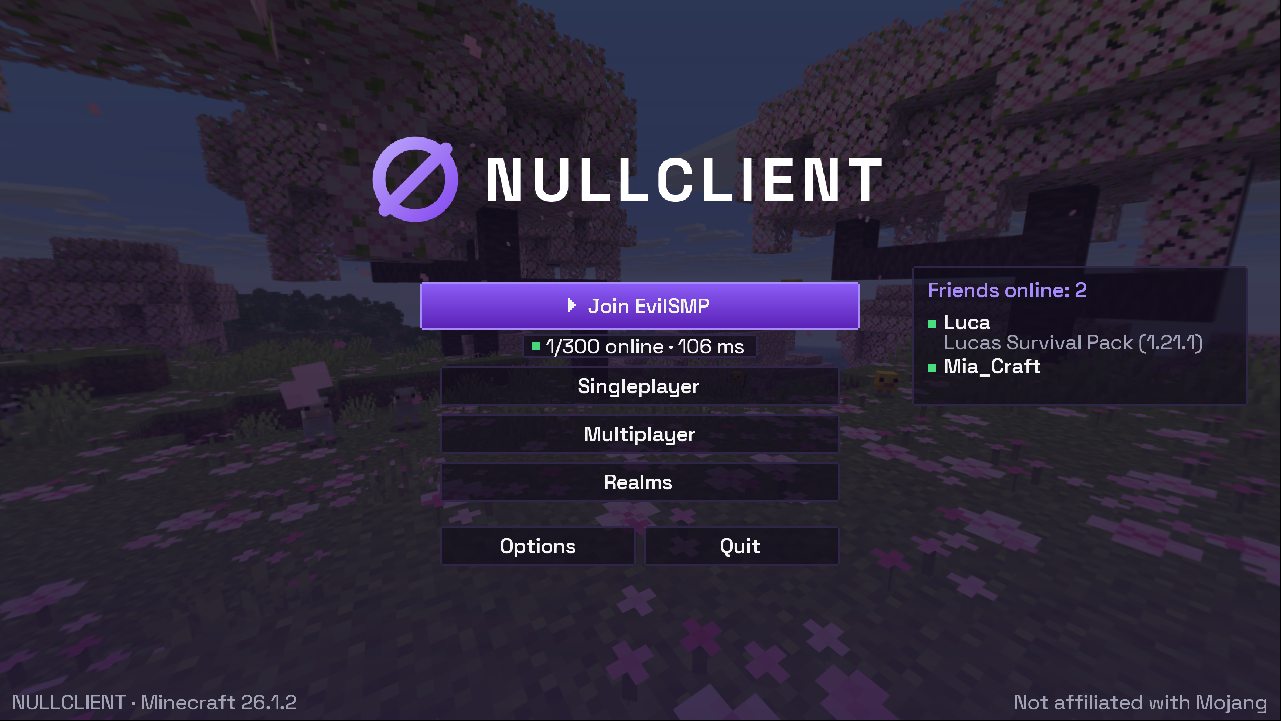
Your title screen, rebuilt.
Fabric instances start with the NULLCLIENT menu: the animated panorama, custom buttons and our own font. You can turn it off in Settings.
What's on it
- Big “Join EvilSMP” button that connects straight away
- Live server status: players online and ping
- Friends online, with what they're playing
- Singleplayer, Multiplayer, Realms, Mods, Options
- Follows your game language
Works with Minecraft 1.20.1 · 1.21.1 · 26.1.x
Play together
Friends, packs and invites built in.
Create a free NULLCLIENT account. It is separate from Minecraft, so friends can join even without owning the game yet.
Friends list
Send requests by name and see who is online and in which instance.
Share instances
Send your whole modpack to a friend. They import it with one click and get the same mods and versions.
Invites
Invite friends to your server or open your singleplayer world to them. Accepting starts the game and joins.
Null+
Look good. Win fair.
Everything in NULLCLIENT is free. Null+ and the shop add cosmetics only, with no gameplay advantage, and they help pay for development.
Cosmetic types
- Capes
- Wings
- Hats
- Pets
- Auras
- A Null+ badge your friends can see
Get started
Installed in about a minute
Download
Get the 5 MB installer below.
Run it
If Windows SmartScreen appears, click “More info”, then “Run anyway”. The installer isn't code-signed yet.
Sign in
Sign in with the Microsoft account that owns Minecraft: Java Edition.
Play
Create an instance, add mods if you like and press Play.
System requirements
| System | Windows 10 / 11, 64-bit |
|---|---|
| Java | Downloaded automatically for each Minecraft version |
| Account | Microsoft account with Minecraft: Java Edition (without one you can play the official demo) |
| Languages | English, German |
| Installer | NULLCLIENT_0.1.0_x64-setup.exe · 5.0 MB |
| SHA-256 | 294B7A80EDFF2AF1A3AC3683D4CDC88E953042D462E00D8DCF4A6620F0D72F92 |
FAQ
Is NULLCLIENT free?
Yes. The launcher, mods, friends and sharing cost nothing. Only cosmetics and Null+ are paid.
Do I need to own Minecraft?
To play the full game, yes: Minecraft: Java Edition on your Microsoft account. Without it you can play the official Minecraft demo, and you can still use the NULLCLIENT account for friends and modpacks.
Why does Windows warn me about the installer?
The installer isn't signed with a paid certificate yet, so SmartScreen doesn't know it. Compare the SHA-256 above if you want to be sure it's the original file.
Will I get banned on servers?
NULLCLIENT changes the title screen and adds cosmetics. It adds no cheats. Mods you install yourself still have to follow each server's rules.
Can I keep my mods from another launcher?
Export your pack as .mrpack or CurseForge zip and import it on the Discover page. You can also add single .jar files to an instance.
Can I translate NULLCLIENT into my language?
Yes. Each language is a single JSON file. Send it to us and it ships in the next version.